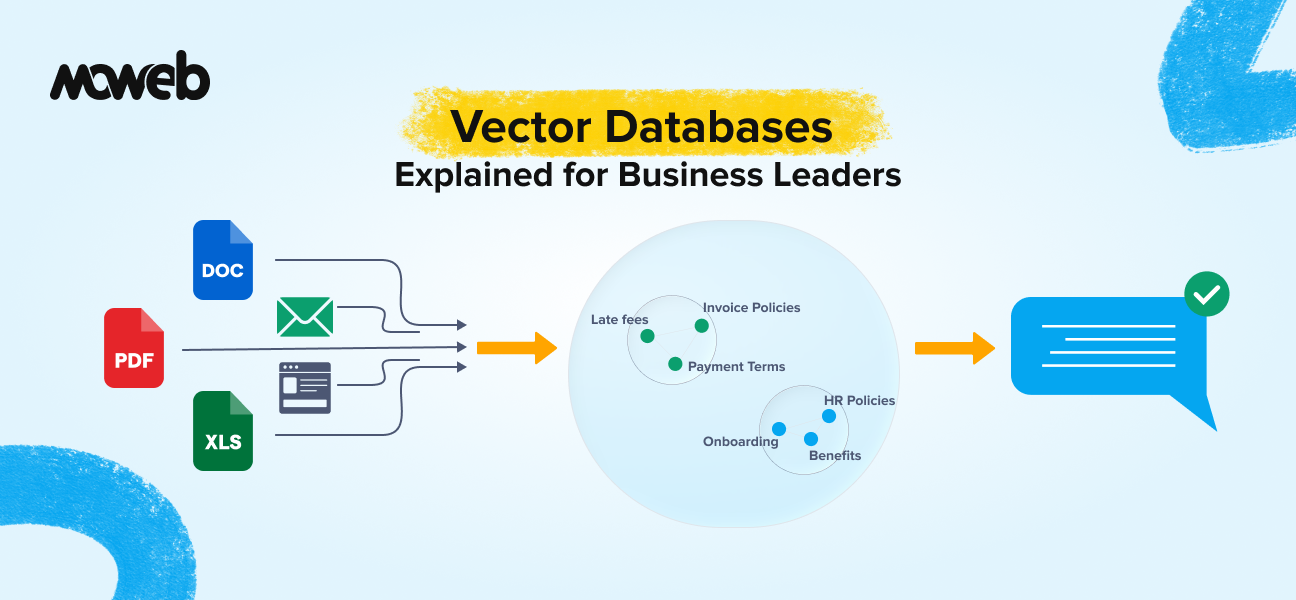
What is a vector database in plain language? A vector database is a specialised data store that saves and searches information based on meaning rather than exact keywords. It converts text, images, or documents into numerical representations called vectors and finds matches by comparing how similar two vectors are. This is what allows AI systems to understand that “show me something affordable” means the same thing as “I need a budget-friendly option”, even though the words are completely different.
Why do vector databases matter for enterprise AI? Vector databases are the memory layer behind most enterprise AI applications, including RAG systems, semantic search, recommendation engines, and AI-powered chatbots. Without a vector database, an AI system has no reliable way to find relevant information from your organisation’s private data at the moment it needs to answer a question. They are the infrastructure that makes AI responses accurate, contextual, and grounded in your actual business knowledge.
Think about the last time you searched your company’s internal knowledge base and got back a list of documents that had nothing to do with what you actually needed. You typed something perfectly reasonable, and the system returned results based on whether your exact words appeared in the document, not whether the document actually answered your question.
That is a keyword search. And it is the reason most enterprise search tools frustrate their users.
The AI systems that actually work well use something fundamentally different. They understand what you mean, not just what you typed. And the technology that makes this possible is the vector database.
This guide explains what vector databases are, why they have become the backbone of modern enterprise AI, and what business leaders need to understand before signing off on an AI project that relies on them. The vector database market in 2026 is one of the fastest-growing segments in enterprise infrastructure. Gartner now tracks vector databases as a distinct category within its data management technology landscape, reflecting how central they have become to AI system architecture.
What Is a Vector Database? The Non-Technical Explanation
To understand vector databases, you first need to understand why traditional databases fall short for AI.
A traditional relational database (think Oracle, MySQL, or PostgreSQL) stores information in rows and columns. It is designed to answer questions like “find all contracts signed after 1 January 2024” or “give me every customer whose account balance exceeds £10,000.” These are exact, structured queries. The database finds matches by comparing specific values. If the value matches, the record comes back. If it does not, it does not.
This works brilliantly for structured business data. It breaks down completely for anything involving meaning, context, or language.
A vector database works differently. Instead of storing raw text or structured records, it stores a mathematical representation of each piece of content. This representation is called a vector or embedding. The key insight is that content with similar meanings ends up with similar vectors, regardless of the specific words used. “Affordable pricing” and “cost-effective solution” are linguistically different but semantically close, and a vector database understands that. A traditional database does not.
When you search a vector database, the system converts your query into a vector and then finds the stored vectors most similar to it. The result is a search that finds what you mean, not just what you typed. This is called semantic search, and it is what powers the AI systems that actually feel intelligent when you interact with them.
Why This Matters More Than It Sounds
The shift from keyword search to semantic search is not a minor technical upgrade. It changes what AI can do for your business in a fundamental way.
Consider a few real scenarios that illustrate the difference:
Customer support: An employee searches your internal knowledge base for “what do we do when a client disputes an invoice after 90 days?” A keyword system returns documents containing the words “invoice” and “dispute.” A semantic search system returns the actual late-payment dispute-resolution policy, even if that policy uses phrases such as “payment disagreements beyond the standard credit period.” The employee gets the right answer immediately instead of reading through irrelevant results.
Sales and CRM: A sales rep asks an AI assistant, “Which clients in the manufacturing sector have shown interest in automation solutions in the last quarter?” A keyword system cannot answer this without exact field matches. A vector database-powered system understands the intent and surfaces relevant records from call notes, emails, and CRM entries, even when those records use varying language like “process efficiency” or “workflow automation” rather than your exact search terms.
Legal and compliance: A compliance officer needs to find all internal communications where the term “margin requirements” was discussed in the context of a specific regulatory change, even if the communications use phrases like “capital buffers,” “liquidity thresholds,” or “risk ratios” interchangeably. Semantic search handles this. Keyword search does not.
In each case, the vector database is not just a database. It is the component that gives an AI system the ability to find relevant information across your entire knowledge base based on intent and meaning, not pattern matching.
The Connection Between Vector Databases and RAG
If you have been following the conversation about enterprise AI over the past two years, you have probably encountered the term RAG (Retrieval-Augmented Generation). Vector databases and RAG are closely connected, and understanding one helps you understand the other.
RAG is the architecture that allows a large language model (LLM) to answer questions using your organisation’s private data rather than relying only on what it was trained on. The process works roughly like this: a user asks a question, the system searches your knowledge base for relevant content, retrieves the most relevant passages, and feeds them to the LLM as context. The LLM then generates an answer grounded in those specific passages rather than making something up.
The vector database is what makes the retrieval step possible. Without it, the system has no efficient way to search through thousands of documents and find the ones most relevant to a specific query in real time. The vector database converts every document in your knowledge base into embeddings during an indexing phase, then allows near-instant similarity search at query time. This is why, when a vendor tells you they are building you a RAG-powered AI assistant, they are almost certainly building it on top of a vector database. The two are inseparable in practice. If you want to understand more about how RAG works and when it is the right choice for your organisation, our guide on what RAG is and when enterprises should use it covers that in detail.
What Goes Into a Vector Database: The Three Core Concepts
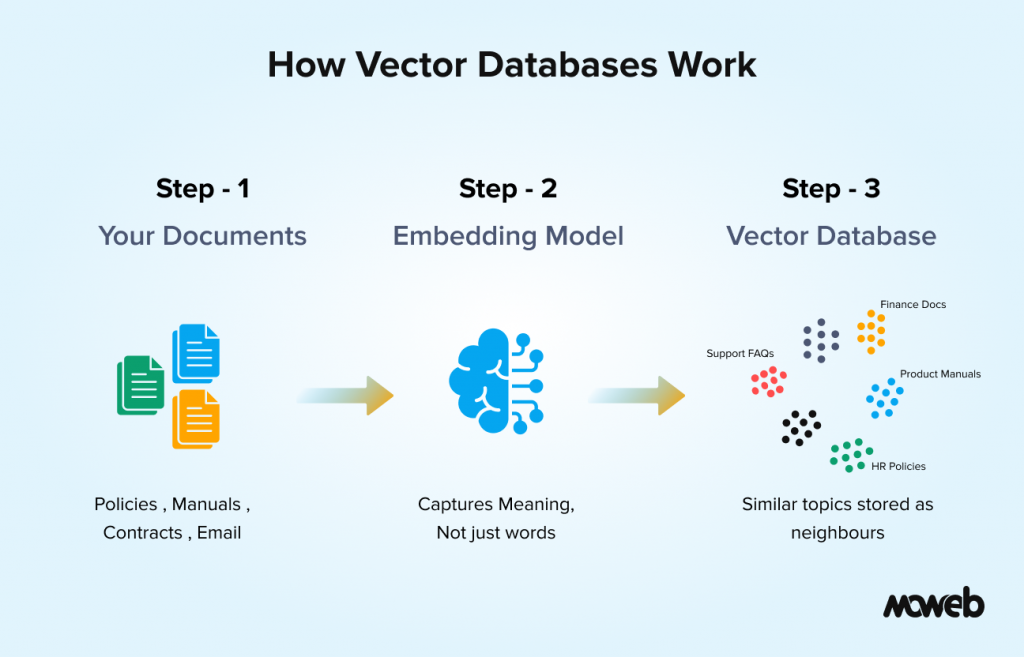
You do not need to understand the mathematics of vector embeddings to make good decisions about AI investments. But knowing three core concepts will help you ask the right questions and evaluate vendor claims more critically.
Embeddings are the numerical representations of content that the database stores. Every document, paragraph, or data record gets converted into a long list of numbers (a vector) by an embedding model. The embedding model is trained to place similar content close together in a high-dimensional space. Think of it like a very large map where similar ideas are in the same neighbourhood, regardless of which specific words were used to express them. The quality of your embedding model directly affects retrieval quality.
Indexing is the process of converting your documents into embeddings and storing them in the database before any users make queries. For a large enterprise corpus, this can involve processing tens of thousands to hundreds of thousands of documents. Good indexing includes not just the embeddings but also metadata: document source, creation date, department, access classification, and other attributes that can be used to filter results.
Similarity search is what happens at query time. When a user submits a query, it gets converted into a vector, and the database searches for the stored vectors most similar to it. The mathematical measure used is typically cosine similarity or dot product similarity. Because searching every vector in a large corpus one by one would be too slow for real-time use, production vector databases use approximate nearest neighbor (ANN) algorithms to find the closest matches very quickly without scanning every entry. The most widely adopted ANN method is HNSW indexing (Hierarchical Navigable Small World graphs), which most purpose-built vector databases use by default. The database returns the top-k most similar results, which are then passed to the LLM or presented directly to the user. The speed of this search (measured in milliseconds at enterprise scale) is one of the key engineering considerations when choosing a vector database.
Vector Database Options: What Business Leaders Should Know
When your technical team proposes a vector database for an AI project, they will likely evaluate several options. You do not need to make this decision yourself, but knowing the landscape helps you have a more informed conversation.
The vector database market in 2026 broadly splits into three categories:
Purpose-built vector databases are designed from the ground up for high-performance vector search. Pinecone, Qdrant, Weaviate, and Milvus fall into this category. They offer the best raw performance for large-scale semantic search and are the right choice when vector search is the primary workload. The trade-off is that they introduce a new piece of infrastructure your team needs to operate and maintain.
Vector-capable traditional databases are existing database systems that have added vector search as a feature. PostgreSQL with the pgvector extension is the most widely deployed example. If your organisation is already running PostgreSQL, adding pgvector can be a lower-friction path to vector search capability. MongoDB Atlas Vector Search is also a strong option for organisations already running MongoDB document databases who want to add semantic search within their existing infrastructure. Performance at very large scale is less strong than purpose-built options, but for many enterprise knowledge systems, the difference is not practically significant.
Cloud-provider-native solutions are vector search capabilities offered as part of broader cloud AI services. AWS offers both OpenSearch with k-NN for direct deployment and Amazon Bedrock Knowledge Bases for teams building on the Bedrock ecosystem. Azure has AI Search (formerly Cognitive Search) with vector support, and Google Cloud has Vertex AI Matching Engine. These are a natural fit for organisations that want to keep their AI infrastructure within a single cloud provider’s ecosystem and benefit from existing enterprise agreements and compliance certifications.
The right choice depends on your data volume, existing infrastructure, data residency requirements, and in-house operational capability. For most mid-market enterprise deployments, the differences between options matter less than the quality of the implementation built on top of them.
Semantic Search vs. Keyword Search: A Business Decision, Not Just a Technical One
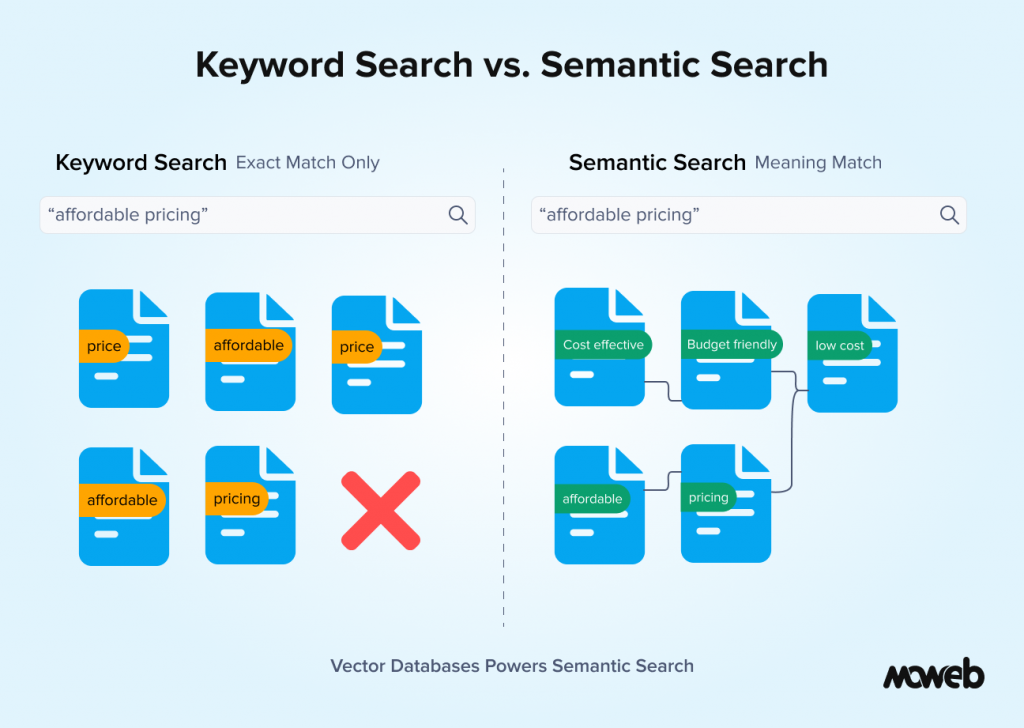
One question that comes up regularly in enterprise AI planning conversations is whether semantic search should replace keyword search entirely or complement it.
The honest answer is that for most enterprise use cases, the strongest AI systems use both together. This is called hybrid search, and it is important to understand why.
Vector search excels at conceptual matching. It is brilliant at finding documents that express the same idea in different words. But it can be imprecise for very specific queries involving named entities: contract numbers, employee IDs, regulation codes, product SKUs. When a user needs to find exactly “clause 4.2 of contract MSA-2024-0891,” a keyword search will find it reliably. A vector search might surface related contracts instead.
Hybrid search engines run both a semantic vector search and a traditional keyword search simultaneously, then merge and rank the combined results. The result is a system that handles both “find me the relevant policy on late supplier payments” (semantic) and “find contract number MSA-2024-0891” (keyword) with equal reliability.
When evaluating an AI system proposal, it is worth asking explicitly: Does this use pure vector search, or hybrid search? For enterprise deployments handling diverse document types and query patterns, hybrid search is almost always the better architecture.
What Business Leaders Should Ask Before Approving an AI Project That Uses Vector Databases
Understanding the vector databases conceptually is useful. Knowing the right questions to ask your technical team or an AI vendor is more useful still. Here are the questions that matter most from a business decision perspective:
Where will our data be stored? Vector databases can be hosted in managed cloud services (meaning your documents and their embeddings reside on a third-party infrastructure) or self-hosted within your own environment. For sensitive data, this is a compliance and data governance question, not just a technical one.
How is access control handled? Can the system ensure that a user who queries the AI assistant only retrieves documents they are authorised to see? Access control needs to be enforced at the retrieval layer, not just at the application layer. This is particularly important for organisations where different teams, roles, or departments have different data access permissions.
How fresh will the data be? When documents are updated, how quickly does the system reflect those changes? For use cases involving compliance policies, pricing documents, or regulatory guidance that changes regularly, the freshness of the indexed data directly affects the accuracy of AI responses.
How will retrieval quality be measured? What metrics will be used to evaluate whether the system is actually finding relevant information? A vendor who cannot answer this question clearly is not operating a production-grade system.
What happens when the system cannot find an answer? A well-built RAG system tells the user clearly when it does not have sufficient information to answer a question reliably. A poorly built one makes something up. Understanding the fallback behaviour is critical for compliance-sensitive applications.
Where Vector Databases Are Being Used in Enterprise AI Today
To make this concrete, here are the enterprise AI applications where vector databases are doing real work right now across industries Moweb works in:
Enterprise knowledge management: Large organisations with thousands of internal documents, policies, and procedures are deploying semantic search layers on top of their existing knowledge bases. Employees ask questions in natural language and get accurate, sourced answers instead of scrolling through SharePoint.
Customer-facing AI assistants: Product and support chatbots that answer from a company’s actual documentation, FAQs, and knowledge articles rather than a scripted decision tree. The vector database allows the assistant to find the right answer even when the customer unexpectedly phrases their question.
Regulatory and compliance search: Legal and compliance teams in financial services, healthcare, and manufacturing use semantic search to query large regulatory document repositories. The ability to find relevant guidance based on intent rather than exact terminology significantly reduces manual research time.
Sales and CRM intelligence: Sales teams using AI assistants to surface relevant case studies, competitor intelligence, pricing precedents, and product information from large internal repositories based on the context of a current deal or conversation.
Field operations and maintenance: Engineering and operations teams using mobile AI assistants to query technical manuals, maintenance logs, and incident histories in natural language, even when the relevant entries use different technical terminology across documents from different eras or vendors.
Multimodal vector search: An emerging 2026 use case where the vector database stores embeddings not just of text but of images, diagrams, product photos, and scanned documents simultaneously. A field engineer can photograph a component and ask, “What maintenance procedure applies to this part?” – The vector database matches the image against technical diagram embeddings alongside text-based entries, surfacing the most relevant result regardless of input format. This multimodal capability is now available in Weaviate, Qdrant, and through cloud-native services like Amazon Bedrock.
Frequently Asked Questions About Vector Databases for Business Leaders
What is the difference between a vector database and a regular database? A regular database stores structured data and finds matches by comparing exact values. A vector database stores numerical representations (embeddings) of content and finds matches by comparing how similar two pieces of content are in meaning. Regular databases are better for structured business data like transactions and records. Vector databases are better for anything involving language, documents, or unstructured content where meaning and context matter.
Do we need a vector database to build an AI chatbot or assistant? Not for every type of AI assistant, but for any assistant that needs to answer accurately from your organisation’s private documents or knowledge base, yes. Without a vector database, the system cannot efficiently find relevant information from your document corpus at query time. An AI assistant without vector search either relies entirely on the LLM’s general training (which does not include your proprietary data) or uses slow, imprecise keyword search.
How much data do we need to justify investing in a vector database? There is no fixed threshold, but as a practical guide, if your knowledge base has more than a few hundred documents that are queried regularly, a vector database will produce better results than a keyword search. If it has thousands of documents or more, the difference in retrieval quality is significant, and the business case for vector search is strong.
Is our data safe in a managed vector database service like Pinecone? Managed vector database services, encrypted data at rest and in transit, and operated under standard enterprise security certifications (SOC 2, ISO 27001). However, your document content and embeddings do reside on third-party infrastructure. Organisations with strict data sovereignty requirements, highly sensitive data classifications, or regulatory restrictions on data residency should evaluate self-hosted options or cloud-provider-native solutions where data stays within an existing enterprise cloud agreement.
How does a vector database handle documents in multiple languages? It depends on the embedding model used. Some embedding models (like OpenAI’s text-embedding-3-large) have reasonable multilingual capability but are strongest in English. Others (like Cohere Embed v4 or BGE-M3) are specifically designed for multilingual corpora and handle semantic search across languages reliably. If your organisation operates in multiple languages, this is an important specification to confirm with your technical team or vendor.
What is the typical cost of implementing a vector database for an enterprise AI project? Costs vary widely depending on the chosen platform, data volume, and query throughput requirements. For a mid-market enterprise knowledge system with a few hundred thousand documents and moderate query volume, managed vector database costs typically run in the range of a few hundred to a few thousand dollars per month. Implementation costs (the engineering work to build and deploy the full system) are typically the largest investment. Moweb’s Generative AI & LLM development team can provide a scoped estimate based on your specific requirements.
What questions should I ask a vendor who says their AI uses vector search? Ask where the vectors are stored and under what data residency model. Ask how access control is enforced at the retrieval layer. Ask whether they use pure vector search or hybrid search. Ask how they measure and monitor retrieval quality over time. Ask what happens when the system cannot find a relevant answer. A vendor who can answer all five clearly is building enterprise-grade systems. One who deflects or does not understand the questions is not.
Conclusion: Vector Databases Are Infrastructure, Not a Detail
When business leaders hear about AI projects involving RAG, semantic search, or intelligent knowledge management, the vector database is often treated as a background technical detail. It is not. It is the foundation on which the entire system’s accuracy and reliability rests.
Getting it right means choosing the correct storage model for your data sovereignty requirements, implementing proper access controls, indexing your data with metadata that enables meaningful filtering, and combining semantic and keyword search for robust production performance.
Getting it wrong means an AI system that sounds impressive in a demo but returns irrelevant or unauthorised content in production, which is worse than not deploying AI at all from a compliance and trust perspective.If you are evaluating an AI project that involves your organisation’s internal knowledge, documents, or data, the questions in this guide will help you have a much more informed conversation with your technical team or with vendors. And if you want a second opinion on an existing architecture or a proposed approach, Moweb’s AI and ML development team can help you assess it. Get in touch to start that conversation.
Found this post insightful? Don’t forget to share it with your network!




 India
India USA
USA