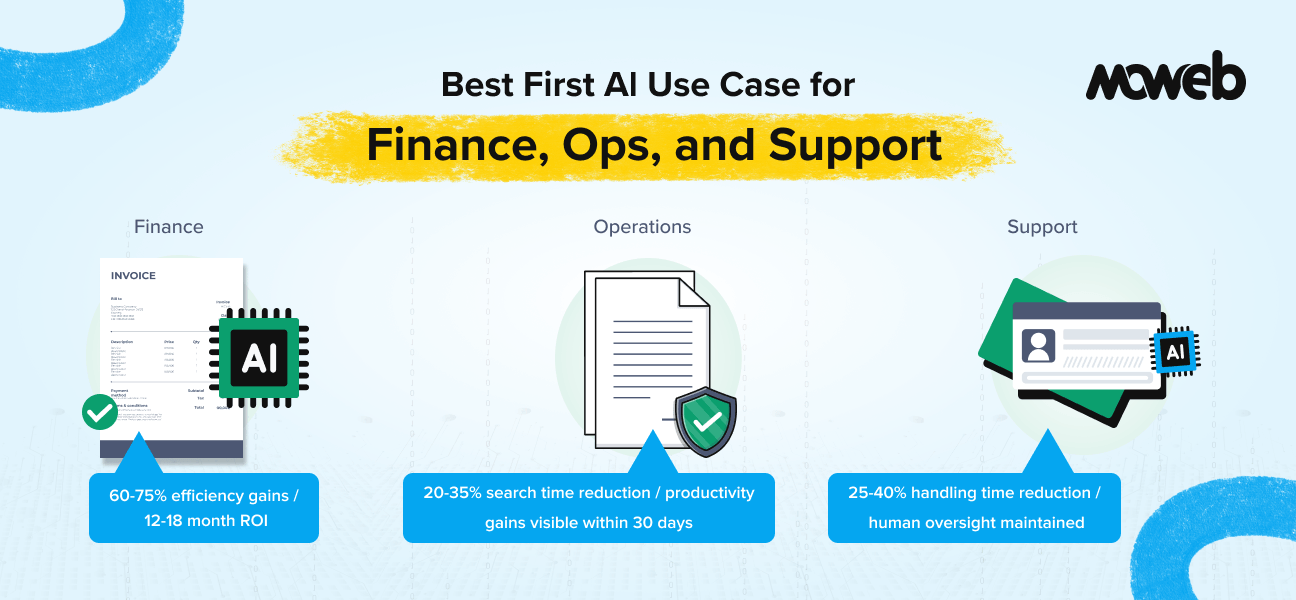
What is the best first AI use case for enterprise finance teams? For finance teams, the best first AI use case is invoice processing and accounts payable automation. It has structured, high-volume, repetitive workflows with clear error costs, accessible historical data, measurable success metrics (processing time, error rate, exception rate), and no requirement for AI-generated content that would trigger compliance review. Finance teams deploying invoice processing AI consistently report 60-75% efficiency gains within the first year.
What is the best first AI use case for enterprise operations teams? For operations teams, the best first AI use case is an internal knowledge assistant built on a RAG system. Operations teams typically have the highest density of documentation, policies, and procedures that employees need to access quickly and accurately. A knowledge assistant reduces information search time, improves consistency of process execution, and generates measurable productivity gains within the first month of production deployment – with significantly lower compliance complexity than AI applications that influence external decisions.
What is the best first AI use case for customer support teams? For support teams, the best first AI use case is AI-assisted triage and response drafting – not full automation. Deploying a copilot that suggests responses, surfaces relevant knowledge base articles, and summarises ticket history for the human agent reduces average handling time by 25-40% without the governance complexity of fully autonomous ticket resolution. This builds internal confidence in AI quality before expanding to more autonomous workflows.
The most common and most expensive mistake in enterprise AI is choosing the first use case based on what sounds most impressive rather than what is most likely to succeed.
An enterprise knowledge graph that connects 50 systems sounds more transformative than invoice-processing automation. A customer service agent who handles complex complaint resolution autonomously sounds more impactful than a response-drafting copilot. A predictive model that forecasts which strategic initiatives will generate the most ROI sounds more valuable than a contract review classifier.
The problem is that the impressive-sounding use cases are almost always the hardest to build, the slowest to validate, and the most likely to stall in pilot purgatory. The less glamorous ones – invoice processing, knowledge assistants, response drafting – are the ones that reach production, generate ROI, build internal confidence in AI, and create the foundation for the more ambitious deployments that follow.
A 2026 McKinsey CFO survey found that 44% of organisations were already using generative AI across more than five use cases, up from just 7% the prior year, and 65% planned to increase AI investment. Yet nearly two-thirds of respondents reported their organisations had not yet begun scaling AI across the enterprise. The characteristic that separates organisations generating real AI returns from those stuck in pilot is consistent: they chose use cases where the data was accessible, the process was well-defined, success was measurable, and the consequence of an incorrect AI output was recoverable.
The Selection Criteria That Determine First-Use-Case Success
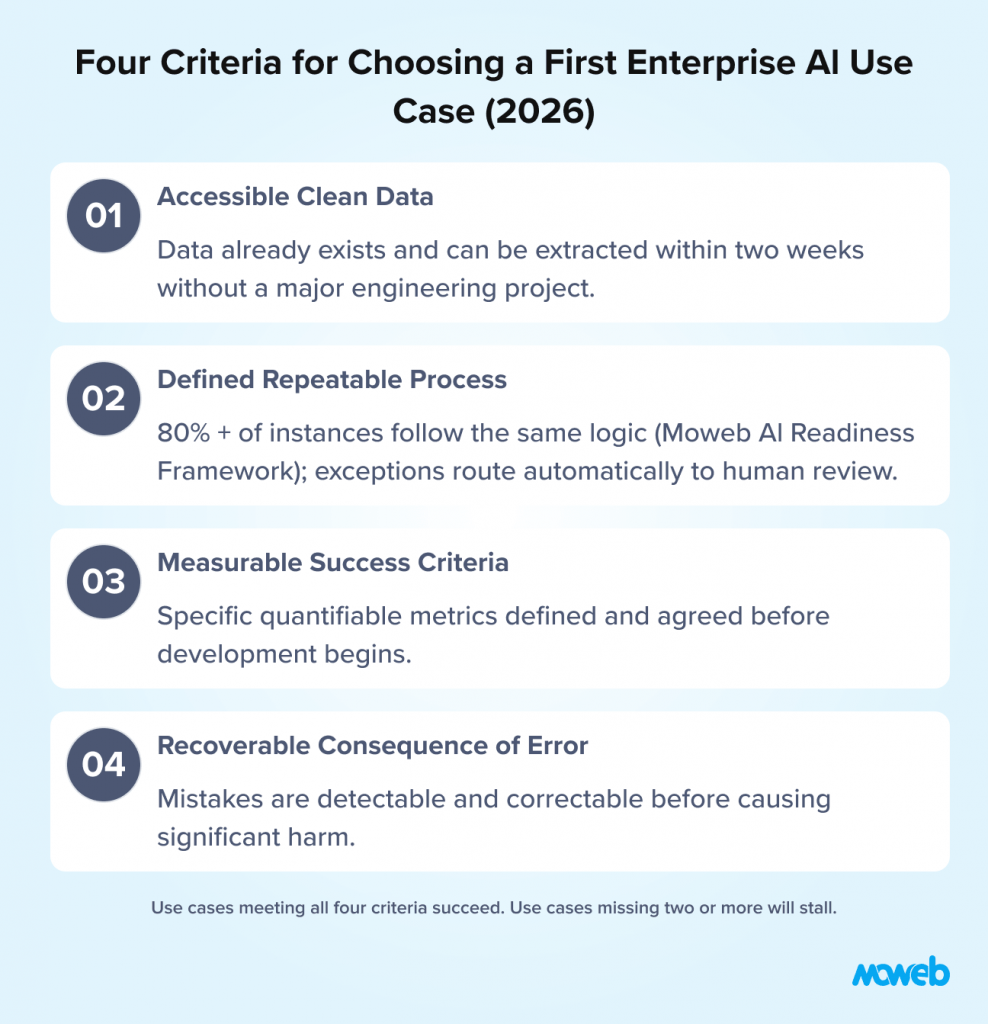
Before getting function-specific, it is worth establishing the four criteria that consistently predict whether a first AI use case will reach production and generate ROI or stall in pilot. Apply these to any use case you are evaluating.
Criterion 1: Accessible, clean data for the specific use case. The AI system can only be as good as the data it runs on. The first use case should be one where the required data already exists, is accessible from a technical standpoint, and is reasonably clean and consistent. This is not an abstract quality standard – it means: can you export the relevant data in a format an AI pipeline can process, within two weeks, without requiring a major data engineering project? If not, data readiness is a prerequisite, not a parallel workstream.
Criterion 2: A defined, repeatable process with clear boundaries. AI performs best on tasks with defined inputs, defined outputs, and a clear process logic that can be learned from examples. Open-ended, highly variable processes that require significant human judgment for most cases are poor first AI targets regardless of their strategic importance. The first use case should be a process where 80% of instances follow the same basic logic, even if the remaining 20% require human escalation.
Criterion 3: Measurable success criteria you can define before building. You must be able to answer “how will we know if this worked?” before the project starts. Processing time reduction, error rate improvement, first-contact resolution rate, or cost per unit are measurable. “Improved user experience” or “better decision support” are not. The first use case should have at least two specific, quantifiable success metrics that the team agrees on before development begins.
Criterion 4: A recoverable consequence of incorrect AI output. The first AI deployment in any organisation is a learning experience. The AI will make mistakes. The first use case should be one where those mistakes are detectable and recoverable before they cause significant harm – not one where a single incorrect AI output creates a customer complaint, a regulatory issue, or a financial loss.
These four criteria are why invoice processing, knowledge assistants, and response drafting consistently succeed as first use cases across enterprise functions. They meet all four criteria in a way that more ambitious alternatives do not.
Finance Teams: Start with Invoice Processing and AP Automation
Invoice processing is the textbook example of a high-ROI first AI use case. A 2026 Deloitte survey of more than 570 financial services leaders found that worker access to AI doubled in a single year, from 30% to 62% of employees now equipped with sanctioned AI tools, and among those who started with invoice processing and accounts payable, the results are consistently strong.
Why invoice processing meets all four criteria:
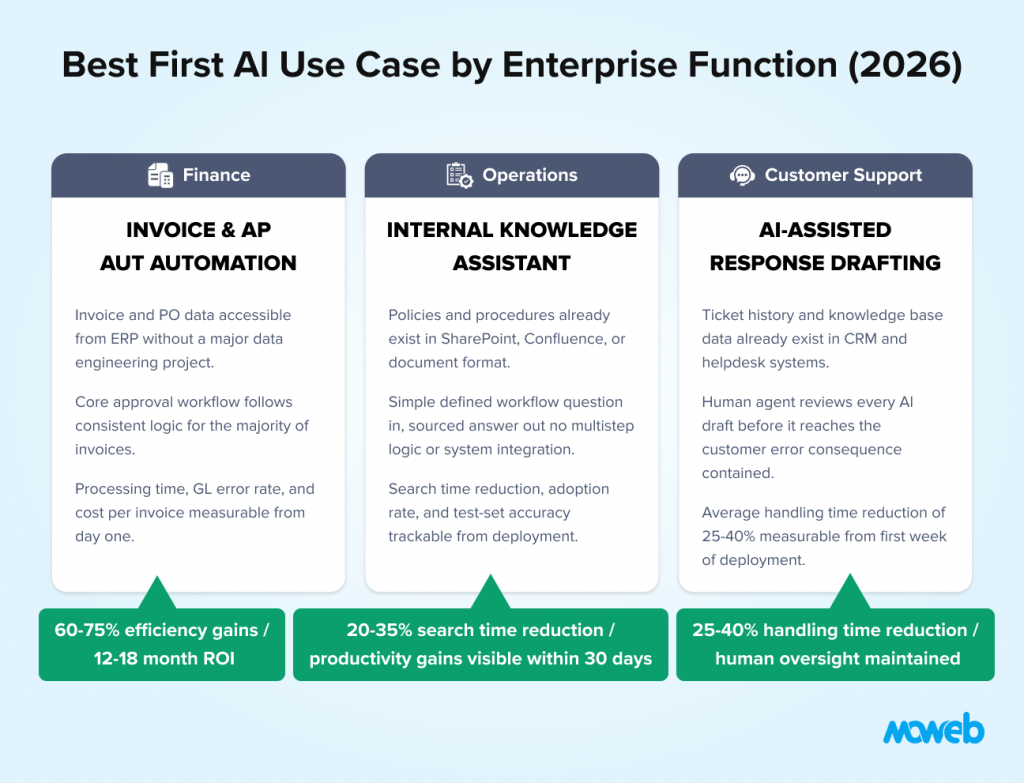
Data is accessible and structured. Invoices are digital documents with a predictable structure. Historical invoice data and the accounting system records that match them are accessible from most ERP systems. The data preparation required is modest compared to use cases requiring complex feature engineering or external data sources.
The process is defined and repeatable. The core invoice processing workflow – receive invoice, extract line items, match to purchase order, validate, route for approval, post to accounting system – follows a consistent logic for the majority of invoices. Exceptions (missing PO, disputed quantities, unfamiliar vendors) are the minority and route naturally to human review.
Success metrics are straightforward. Processing time per invoice, exception rate, error rate in GL coding, and processing cost per invoice are all measurable, have established baselines, and can be tracked from day one.
The consequence of the error is recoverable. An invoice misclassified to the wrong GL code is caught in the month-end review. An invoice routed to the wrong approver generates a correction request. Neither creates a compliance event or customer impact that cannot be addressed.
The documented outcomes from finance AI, starting with invoice processing and AP automation, are consistent. Finance teams report 60–75% efficiency gains, 85–90% reduction in manual reconciliation effort, and 12–18 month ROI on platform investments, consistent with McKinsey findings that AI tools replace manual number crunching and save up to 30% of finance professionals’ time. Finance teams deploying AI here routinely achieve ROI within the first quarter and use that demonstrated value to build the executive confidence needed for broader AI investment.
For realistic cost and timeline expectations before committing to a finance AI deployment, see our breakdown of what an AI proof of concept costs in 2026.
The natural sequence from invoice processing: Once invoice processing is running reliably, the data infrastructure and governance discipline established supports rapid deployment of adjacent finance AI use cases: expense report processing and policy compliance checking, contract data extraction and obligation tracking, cash flow forecasting using historical payment pattern data, and anomaly detection for unusual transactions.
Each subsequent use case builds on the established data pipeline, the integration with the ERP, and the trust the finance team has built in AI-generated outputs. The first use case is an investment in infrastructure as much as a standalone productivity gain.
What finance teams should not start with: Predictive financial models (demand on model governance and explainability that first-deployment teams are not yet equipped for), AI-generated management reporting (quality and accuracy standards are too high to tolerate learning-curve errors), and autonomous payment processing (consequence of error is irreversible and compliance-critical).
Operations Teams: Start with an Internal Knowledge Assistant
Operations teams have a specific and consistently underserved information problem: enormous volumes of policies, procedures, standards, and operational guidance that employees need to access quickly and accurately to do their jobs – and inadequate tools for finding and using that information in real time.
The consequences of this gap are quantifiable. Employees spend 20-35% of their working week searching for information they need to make decisions or execute processes. New employee onboarding is slow because the organisational knowledge needed to work effectively is buried in documents that employees cannot find. Process execution is inconsistent because different team members are working from different versions of the same guidance.
A RAG-based internal knowledge assistant – an AI system that allows employees to ask questions in natural language and receive accurate, sourced answers from the organisation’s policy and procedure library – directly addresses this problem. It is the highest-return and most consistently successful first AI deployment for operations teams. For a full explanation of how RAG-based knowledge systems work and what makes them reliable in enterprise operations contexts, see our guide to what RAG is and when enterprises should use it.
Why the knowledge assistant meets all four criteria for first-use-case success:
Data is accessible. Most organisations have their policies, procedures, and operational guidance in some document format – Word documents, PDFs, SharePoint, Confluence, or similar. Getting this content into a RAG pipeline is a well-understood technical process. The data challenge is quality and currency (outdated documents in the corpus), not accessibility.
The process is defined. A knowledge assistant has a simple, defined workflow: receive a question, retrieve relevant content from the knowledge base, and generate a sourced answer. There is no complex multi-step process logic, no external system integration, and no autonomous action.
Success is measurable. Information search time reduction, employee satisfaction with the knowledge assistant (tracked via feedback mechanisms), accuracy on a test set of representative questions, and adoption rate (queries per week per employee) are all trackable from deployment.
The consequence of the error is recoverable. When a knowledge assistant provides an incorrect answer, the user can verify against the source document (which the assistant cites), report the error through a feedback mechanism, and use the correct information. There is no irreversible consequence and no external impact.
Operational productivity gains from knowledge assistants are immediate and visible. Reducing information search time by even 30 minutes per employee per day across an operations team of 50 people represents 1,500 person-hours per month of recoverable productive capacity. This is the kind of concrete, quantifiable value that justifies investment and builds the internal confidence needed for more ambitious AI deployments.
The natural sequence from the knowledge assistant: Once the knowledge assistant is running, the RAG infrastructure and content indexing pipeline it uses becomes the foundation for adjacent applications: an AI-powered onboarding assistant for new employees, a process audit tool that checks whether documented procedures match actual execution patterns, a regulatory change monitoring system that tracks updates to relevant standards and flags affected internal procedures, and eventually agent-based automation of the routine process steps the knowledge system documents.
What operations teams should not start with: Complex process automation involving multiple system integrations (the integration complexity exceeds first-deployment team capability), predictive operational models (requires data engineering foundations that are not yet established), and customer-facing AI (consequence of error has external impact before the team has validated quality in a lower-stakes internal environment).
Support Teams: Start with AI-Assisted Response Drafting, Not Full Automation
The customer support use case is where enterprise AI ambitions most consistently outrun enterprise AI readiness. The promise of AI that autonomously resolves 60-70% of support tickets is real – but it describes a mature deployment built on a foundation of validated quality, established tool integrations, and governance frameworks that first deployments do not have.
Mature customer service AI deployments are resolving 60–70% of tier-1 issues end-to-end, but those are deployments where the AI has been trained on real support data, connected to real backend systems, tested for edge cases and adversarial inputs, and validated at scale. Getting to that point requires a foundation that most support teams do not have on day one.
The right starting point for support teams is AI-assisted response drafting: a copilot that helps human agents do their jobs faster and better, rather than an autonomous agent that replaces them.
What AI-assisted response drafting does: When an agent opens a ticket, the copilot retrieves the customer’s history from the CRM, searches the knowledge base for relevant solutions, analyses the customer’s message for sentiment and urgency, and generates a draft response for the agent to review and send. The agent approves, edits, or discards the draft. The AI handles the information gathering and first-draft generation; the human handles quality and relationship judgment. For clarity on the distinction between a response drafting copilot and a more autonomous support agent, our guide to the difference between AI chatbot, copilot, and AI agent explains where each capability level is appropriate.
Why this is the right starting point: The average handling time reduction from AI-assisted drafting – 25-40% – is significant and immediately measurable. The governance complexity is low: the human agent reviews every output before it reaches the customer, so incorrect AI suggestions are caught before they cause customer impact. The data requirements are accessible: the knowledge base and ticket history that the AI draws from already exist. And the system generates the labelled data (which drafts agents used, which they modified, which they discarded) that will train the more autonomous agent that follows.
The natural sequence from response drafting: Response drafting quality data informs the training of a more autonomous tier-1 resolution agent. Alongside the copilot deployment, implement AI triage and routing: classifying incoming tickets by issue type, urgency, and customer tier, and routing them to the right queue without human triage. Add AI-powered sentiment monitoring that flags escalation-risk conversations proactively. By the time the support team is ready to deploy an autonomous resolution agent for tier-1 issues, they have months of quality validation data, established governance procedures, and operator trust in AI-generated outputs. For the architecture and compliance controls required when support AI handles customer-facing interactions, see our guide to building secure enterprise chatbots with audit trails and compliance.
What support teams should not start with: A fully autonomous resolution agent with no human oversight (governance complexity exceeds first-deployment readiness), a customer-facing chatbot attempting to resolve complex complaints (consequence of error is customer relationship damage before quality is validated), and personalised product recommendation AI (requires customer data integration and recommendation quality validation that first deployments cannot sustain).
The Sequencing Principle: Each Use Case Enables the Next
The single most important insight in enterprise AI use case selection is that the first use case is not just a standalone deployment. It is an investment in the infrastructure, governance discipline, operator trust, and data foundations that every subsequent AI use case will build on.
The organisations generating the highest AI ROI in 2026, which IDC and Microsoft identify as “Frontier Firms,” are those that understood this compounding dynamic from the beginning, reporting AI investment returns roughly three times higher than slow adopters. Their third AI use case is faster and cheaper to build than their first because the data pipelines, the integration patterns, the governance frameworks, and the internal AI literacy are already in place. Their teams approach the fourth use case with confidence rather than apprehension, because they have seen AI work reliably in production.
The ROI trajectory for organisations deploying their third and fourth use cases rises significantly, because those deployments inherit the infrastructure and trust of what preceded them.
The three starting points recommended in this guide, invoice processing for finance, knowledge assistants for operations, and response drafting for support, share a common characteristic beyond their individual ROI credentials. They each generate assets that make the next deployment more valuable: finance AI generates the data pipeline and ERP integration; operations AI generates the indexed knowledge base and RAG infrastructure; support AI generates the labelled quality training data. Start with the use case that produces the best foundation, not just the best immediate result.
For a structured assessment of which starting point your organisation is best positioned for right now, our AI readiness assessment checklist covers data quality, infrastructure, and use case clarity as distinct readiness dimensions.
Frequently Asked Questions About First AI Use Cases for Enterprise Teams
How do I choose the best first AI use case for my enterprise? Apply four criteria: the required data must already exist and be accessible without a major data engineering project; the process must be defined and repeatable with clear logic; success must be measurable with specific metrics you define before building; and the consequence of an incorrect AI output must be detectable and recoverable. Use cases that meet all four criteria will succeed. Use cases that miss two or more will stall.
How long does it typically take to see ROI from a first enterprise AI deployment? For well-chosen first use cases (invoice processing, knowledge assistants, response drafting), initial ROI is visible within the first quarter of production deployment. The path from project start to production value typically runs 8 to 14 weeks for a focused first deployment with a qualified implementation partner.McKinsey’s 2025 CFO survey found 65% of organisations planned to increase generative AI investment, with the fastest returns consistently coming from use cases in high-volume, structured, repeatable workflows.
Should we start with generative AI or predictive AI for our first use case? For finance and operations first use cases, a mix of both is typical: a RAG-based knowledge assistant uses generative AI for response synthesis and predictive retrieval for document ranking. For a first predictive AI use case (demand forecasting, churn prediction, fraud detection), the data requirements are more demanding – labelled historical data over multiple years – but the ROI per decision influenced is higher. The choice should be driven by your data reality, not by capability preference. See our guide on generative AI vs predictive AI: where to invest first for the full decision framework.
What are the most common reasons first AI use cases fail? The three most consistent failure patterns are: data that proves less clean or accessible than assumed once the project starts (surfacing mid-project as timeline and cost overruns), success criteria that were not defined before building (leading to stakeholder disagreement about whether the system is good enough), and governance that was treated as a post-deployment problem (creating compliance exposure or operator trust crises after launch). All three are avoidable with the right pre-project discipline.
Can we run multiple AI use cases in parallel across different functions? Yes, with appropriate resourcing. Running finance, operations, and support AI deployments in parallel can accelerate total ROI realisation, but each use case requires dedicated attention from both the AI delivery team and the business function stakeholders. The risk of parallel deployment is that attention is spread too thin, each use case receives insufficient stakeholder engagement to reach production quality, and all three stall rather than one succeeding and generating momentum for the others. A sequenced approach (one use case to production before the next starts) is lower risk for organisations new to AI deployment, even if it takes longer in total calendar time.
How do we get executive buy-in for an AI use case that seems unglamorous? Frame the ROI case in the metrics executives care about for that function: processing cost reduction and error rate for finance, employee productivity and onboarding speed for operations, average handling time, and CSAT score for support. The glamour gap between invoice processing and an AI strategy system closes immediately when the numbers are specific. A first AI use case that reaches production and delivers measurable ROI within a quarter generates more executive confidence in AI as a strategic capability than a more ambitious use case that stalls in pilot for six months.
Conclusion: The Best First Use Case Is the One That Actually Reaches Production
The enterprise AI leaders of 2027 and 2028 are the organisations making pragmatic, well-scoped first AI deployment decisions today, not waiting for perfect data, perfect governance, or the perfect use case. Not the ones choosing the most impressive-sounding use cases, but the ones choosing the use cases most likely to succeed, generate measurable value, and create the foundation for everything that follows.
Invoice processing for finance. A knowledge assistant for operations. Response drafting for support. These are not the most exciting AI use cases. They are the ones with the most accessible data, the clearest success metrics, the lowest governance complexity, and the highest probability of reaching production within a quarter and generating ROI within a year.
Start there. Generate the evidence. Build confidence. Then tackle the harder problems from a position of demonstrated capability rather than untested ambition. Moweb’s AI Strategy & Consulting team helps enterprises select, scope, and execute first AI use cases across finance, operations, and support functions with the data assessment, governance design, and delivery rigour that gets use cases from concept to production rather than stuck in pilot. Talk to us about your first AI use case.
Found this post insightful? Don’t forget to share it with your network!





 India
India USA
USA